
How to Avoid Pop‑Up and Scareware Scams
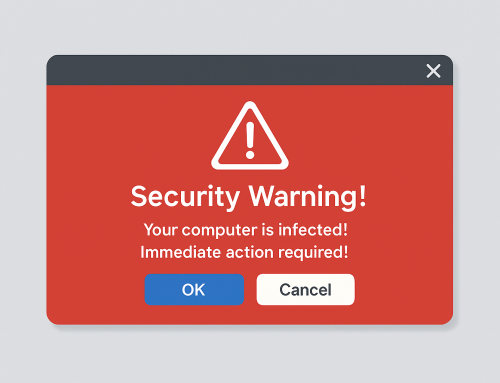
Pop‑up and scareware scams are one of the most common ways people are tricked online. These scams are designed to look like urgent security warnings, often claiming your computer is infected, compromised, or “locked.” Their goal isn’t to help you—it’s to create panic so you act quickly without thinking.
Understanding how these scams work and how to recognize them is the best way to avoid becoming a victim.
What Are Pop‑Up and Scareware Scams?
Scareware is a type of online scam that uses fear and urgency to pressure people into taking unsafe actions. It often appears as a browser pop‑up or full‑screen alert that looks like it’s coming from a trusted company such as Microsoft, Apple, or a well‑known antivirus brand. [support.mi…rosoft.com], [usa.kaspersky.com]
These messages commonly:
- Claim your computer has viruses or serious security problems
- Display alarming warnings or loud alert sounds
- Use urgent language like “ACT NOW” or “IMMEDIATE ACTION REQUIRED”
- Try to get you to call a phone number, click a button, or download software
The warnings are fake, but they are designed to look convincing and authoritative.
Why These Scams Are So Effective
Pop‑up scams rely on psychology rather than technical skill. They use social engineering—fear, urgency, and authority—to push people into making quick decisions. Even experienced computer users can be caught off guard when a realistic‑looking alert suddenly takes over the screen. [avast.com], [firestormcyber.com]
Scammers know that when people are stressed, they’re more likely to:
- Click before reading carefully
- Trust familiar brand names
- Follow instructions without verifying the source
This is why these scams continue to succeed.
Common Warning Signs of a Scam Pop‑Up
While scareware messages can look official, there are consistent red flags:
- Unexpected alerts: Legitimate security software doesn’t suddenly appear through random websites.
- Phone numbers in warnings: Real tech companies do not include phone numbers in pop‑up security alerts. [consumer.ftc.gov]
- Extreme urgency or threats: Messages that pressure you to act immediately are a major warning sign.
- Full‑screen lockups: Scammers often try to make the message hard to close so you feel trapped. [which.co.uk]
If a message makes you feel rushed or scared, that’s usually the point.
How People Get Exposed to These Scams
Scareware pop‑ups typically appear after:
- Clicking a misleading ad or link
- Visiting compromised or low‑quality websites
- Allowing browser notifications without realizing it
Once exposed, the scam may reappear repeatedly until the underlying issue is addressed by someone who knows what to look for. [which.co.uk]
Why Ignoring or Guessing Can Be Risky
Many people try to “deal with it later” or click around to make the message go away. Unfortunately, interacting with these pop‑ups—even clicking the close button—can sometimes make things worse.
Because these scams are designed to confuse and pressure, the safest approach is to avoid engaging with them at all and have the situation checked properly if you’re unsure whether your system was affected.
Local Help in Spokane & Spokane Valley
If you’re in Spokane, Spokane Valley, or the surrounding areas and you’re seeing pop‑ups or warnings that don’t feel right, you don’t have to handle it alone.
You can bring your computer to Friendly Computers Spokane for a professional review. A quick evaluation can help determine whether a warning is a scam, whether anything was installed, and what your options are—without guesswork or panic.
Sometimes the best protection is simply having someone you trust take a look before the problem grows.
For 15 years, Friendly Computers has serviced over 30,000 customers, computers, laptops, business servers and networks. Our knowledge, expertise, and customer service are unmatched in the Spokane area when it comes to computer and laptop repair, virus removal, tech support and data recovery.
Why Call A GEEK When You Can Call A FRIEND!